What Is eSIM on Xiaomi? Setup and Mobile Internet Abroad in 2026
A digital module replaces the familiar plastic SIM card and provides mobile connectivity abroad without waiting in airport queues. The easiest way to understand what eSIM is on an Android Xiaomi phone is to think of it as a chip soldered onto the motherboard that stores profiles from your chosen carrier.
How the Built-In eSIM Chip Works in Xiaomi and Redmi Smartphones
The eUICC (Embedded Universal Integrated Circuit Card) is a tiny microchip soldered directly onto a smartphone's motherboard. It securely stores the subscriber's encrypted identification data. When you purchase a cellular plan, the carrier creates a digital profile. The device receives it over the air and saves it to the chip's internal memory. There is no longer any need to open the SIM tray.
Technically, the chip performs the same authentication functions on GSM, LTE, and 5G networks as a removable plastic SIM card. The main difference is that its internal memory can hold several independent profiles from different providers.
Key Differences Between an Electronic eSIM and a Traditional Physical SIM Card
A regular SIM card cannot be separated from its physical carrier. To change your plan or mobile carrier, you have to eject the SIM card with a pin and insert another one. Frequent replacements can wear out the plastic, and the tray can easily be dropped and lost while traveling.
A virtual profile is fully protected against mechanical damage. It is not vulnerable to moisture, demagnetization, or impacts when a smartphone is dropped. If your phone is stolen, an additional layer of protection comes into play: a thief cannot remove the chip, insert it into another device, and intercept banking SMS messages.
Benefits of Using a Virtual Profile for Mobile Internet While Traveling
The advantages of this technology are especially noticeable when traveling abroad. It is easier to set up the profile at home, so network access will be available as soon as the plane lands. You do not have to waste time queuing abroad, filling out forms, or presenting your passport — mobile internet will connect automatically.
Roaming costs can drop significantly. If your home carrier charges by the megabyte, a fixed data allowance is available with this roaming plan instead. That allowance is generally enough for maps, taxi bookings, and messaging.
Which Xiaomi and Redmi Smartphones Support eSIM in 2026
Initially, the eUICC module was soldered only into global flagship models. The specifics of Chinese regulations mean that local versions of these models are released with a dual Nano-SIM slot and no eUICC module. Before buying a phone, check whether the specific model supports the technology at the hardware level.
Current List of Compatible Xiaomi Flagships and T-Series Sub-Flagships
The built-in chip first appeared in the brand's twelfth-series smartphones. There is a detail to note about eSIM on the Xiaomi 12 range: the global Xiaomi 12 Pro has a different model number from the base model, while Chinese versions simply do not have the chip. In the sub-flagship range, the Xiaomi 12T and Xiaomi 12T Pro models received built-in eSIM support.
The list of flagships with confirmed compatibility includes:
- Xiaomi 12T Pro in its international variant.
- Xiaomi's thirteenth-series smartphones: 13, 13 Pro, 13 Ultra, as well as 13T and 13T Pro.
- The Xiaomi 14 lineup: the base model, 14 Pro, 14 Ultra, 14T, and 14T Pro.
- The Xiaomi 15 and 15 Pro series (all global versions).
Redmi Note Models with an Integrated eSIM Module
In the mid-range segment, Redmi introduced eUICC later. The first widely available device from the sub-brand was the Redmi Note 13 Pro 5G and its Redmi Note 13 Pro+ 5G version for the international market (the 4G versions do not have this module). In the current lineup, virtual SIM cards work without restrictions on the Redmi Note 14 Pro 5G and Note 14 Pro+ 5G. Entry-level devices in the Redmi 12 and 13 series, as well as standard Redmi Note models without the Pro suffix, did not receive chip support.
How to Check Your Device's Compatibility in HyperOS and MIUI
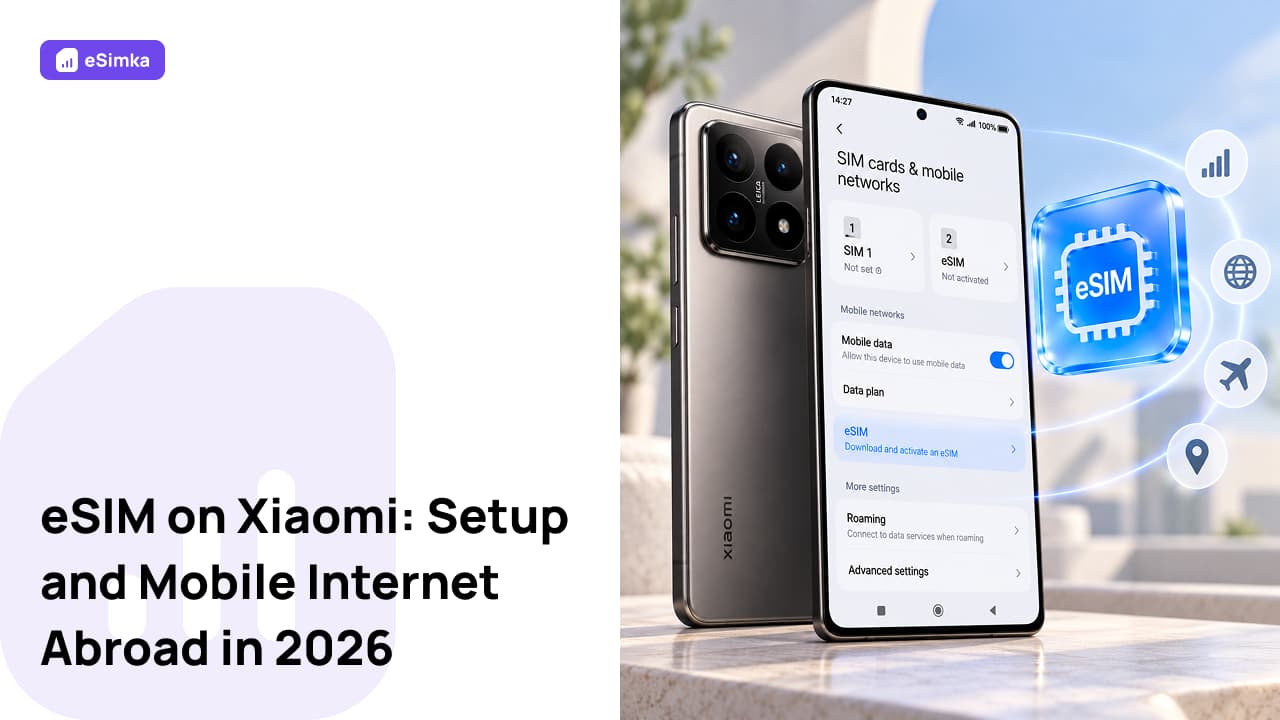
You can check your smartphone's compatibility in HyperOS or MIUI settings in about 30 seconds:
- Open the device's main Settings menu.
- Select “SIM cards and mobile networks.”
- Look for “Use eSIM” or “eSIM management.” If this option is available, the smartphone supports eSIM profiles.
- Enter *#06# on the dial pad. A 32-digit EID number should appear in the list alongside the IMEI.
If the EID number is missing from the list, the device does not support the chip at the hardware level.
Using a Physical SIM and an eSIM Profile Simultaneously on Xiaomi
Most models from the brand have two physical Nano-SIM slots and a built-in eUICC module. However, the phone has only one radio module. As a result, in Dual SIM standby mode, only two lines can remain active at the same time.
When you enable an eSIM profile on a Xiaomi phone, the device automatically deactivates SIM 2. SIM 1 remains active for calls and SMS messages from your home country, while mobile data goes through the digital SIM. This lets you receive banking verification codes without paying for expensive roaming internet.
How to Choose an International Data Plan from the eСимка Service
еСимка provides data packages for trips to more than 150 countries. You can pay for a plan with a regular Russian bank card without overseas accounts or cryptocurrency. A QR code for quick setup is sent by email immediately after payment.
Comparing Local Plans for One Country with Multi-Region Packages
The available plans are grouped according to different needs:
- Local plans are designed for trips to a specific country, such as Turkey, Thailand, or the UAE. They offer the lowest price per gigabyte and direct access to local 4G/5G networks.
- Regional plans (for European or Asian countries) are suitable for itineraries that cross several borders. When you cross a border, your smartphone automatically finds a local carrier's network, so connectivity is not interrupted.
- Global packages with larger data allowances are convenient if you have long layovers at transit hubs along the way.
Step-by-Step Guide to Installing an eSIM Profile on an Android Xiaomi Phone
It is more convenient to download your plan details before departure while you still have a stable home Wi-Fi connection. There is no need to visit a carrier's office.
Adding a Cellular Plan by Scanning a QR Code
Setup takes about a couple of minutes:
- Open your phone's Settings and go to “SIM cards and mobile networks.”
- Enable “Use eSIM.” Accept the system warning about disabling the second SIM card.
- Tap “Add eSIM” or open the “Manage profiles” section.
- Point your smartphone's camera at the QR code from еСимка, displayed on another device or printed on paper.
- Confirm the operation and wait for the system to recognize the new profile.
Manually Entering Activation Codes and the SM-DP+ Server Address
If you do not have a way to scan the code, enter the details manually:
- At the bottom of the scanning window, tap “Enter manually.”
- Copy the SM-DP+ server address from the email containing your order details (a string such as rsp.example.com) and paste it into the appropriate field.
- Enter the activation code in the designated field. You do not need to fill in the confirmation field unless the carrier has provided a code for it.
- Tap “Next” to complete the setup process.
Data Settings to Configure After Arriving in Another Country
Once you land, all you need to do is switch your internet connection to the new profile.
Enabling Data Roaming and Choosing the Default SIM for Internet Access
Go to “SIM cards and mobile networks.” In the default internet selection field, switch to the еСимка profile. Open “International roaming” and set it to “Always.” Without data roaming enabled, the digital SIM cannot register on a local network. There are no hidden charges: only the data allowance you have paid for is used.
Sharing Mobile Data over Wi-Fi with Tablets and Laptops
With еСимка plans, any compatible model can work as a hotspot. You can share Wi-Fi from your Xiaomi phone with a laptop, tablet, or other travelers' smartphones. If the connection is unavailable, check the APN settings in your profile against the instructions in your account.
Frequently Asked Questions (FAQ)
Does eSIM Support Depend on the Region Where a Xiaomi Smartphone Was Released?
Yes, support for the technology depends directly on the regional version of the specific device. Phones released for the Chinese domestic market (China Distribution) do not have an eUICC module on the motherboard. Global-release devices (Global), European versions (EEA), and some Indian revisions have the chip soldered in. Check the model number on the packaging or look for the EID entry in your phone's settings.
Can You Add eSIM to an Unsupported Xiaomi Phone Through Software?
It is technically impossible to enable the feature through firmware if the motherboard does not have an eUICC chip. The only alternative is a removable SIM card with a built-in chip that works through a third-party app. However, full compatibility is guaranteed only on factory models that have the chip soldered in from the start.
How Many eSIM Profiles Can You Store on One Smartphone?
The built-in chip memory in the brand's smartphones can hold between 5 and 8 different mobile carrier profiles. The exact number depends on the amount of flash memory allocated in the eUICC chip. Only one virtual profile can be active at any given time.
How Do You Transfer an Existing eSIM Profile from One Xiaomi Phone to Another?
Most travel eSIM profiles are single-use: once removed from a device, they cannot be activated again using the old QR code. If your carrier supports transfers, you will need to remove the profile from the old phone while connected to the internet, then scan the same code on the new device. For travel, it is more reliable to purchase a new package specifically for the device you plan to use.
What Should You Do If the Virtual SIM Is Active but Mobile Internet Is Not Working?
First, restart your smartphone. Check whether “Data roaming” is enabled in the SIM settings. Make sure the digital SIM is selected as the primary data connection. Open the profile settings, select “Access points (APN),” and compare the access point name with the instructions provided by the service. If the internet still does not work, change the preferred network type from 5G to “Prefer LTE.”
Does Sending Messages in Messaging Apps Use Mobile Data?
Any data transfer through Telegram, WhatsApp, or other apps consumes megabytes from your purchased package. Text messages use a minimal amount of data, while audio calls, video calls, and scrolling through a feed with media autoplay require significantly more. To save data, disable automatic media downloads in your messaging apps' settings.